AI at Work: The Jobs Changing Fastest
Artificial intelligence is transforming the job market today faster than the advent of the internet in the 2000s or the widespread adoption of smartphones in the 2010s. Whereas automation used to mainly affect manual labor, today neural networks have entered the realm of intellectual work, where creativity and analysis have always been considered the exclusive prerogative of humans.
The numbers speak for themselves: according to recent studies (such as the Microsoft and LinkedIn report), about 75% of knowledge workers worldwide already use AI in their daily work. People say AI helps them save time, focus on their most important work, be more creative, and enjoy their work more.
We are on the cusp of a massive transformation of the labor market. In this article, we’ll explore which sectors are changing the fastest, how AI is impacting professions, how to use neural networks at work to increase productivity by 2 to 10 times, and how to avoid being left behind and instead become a sought-after “AI-enhanced” professional.
How is AI actually changing the way we work?
Many people are currently concerned about which professions AI will replace. Maxim Massenkoff and Peter McCrory from Anthropic investigated the difference between the theoretical impact of artificial intelligence (blue) and its actual application in practice (red).
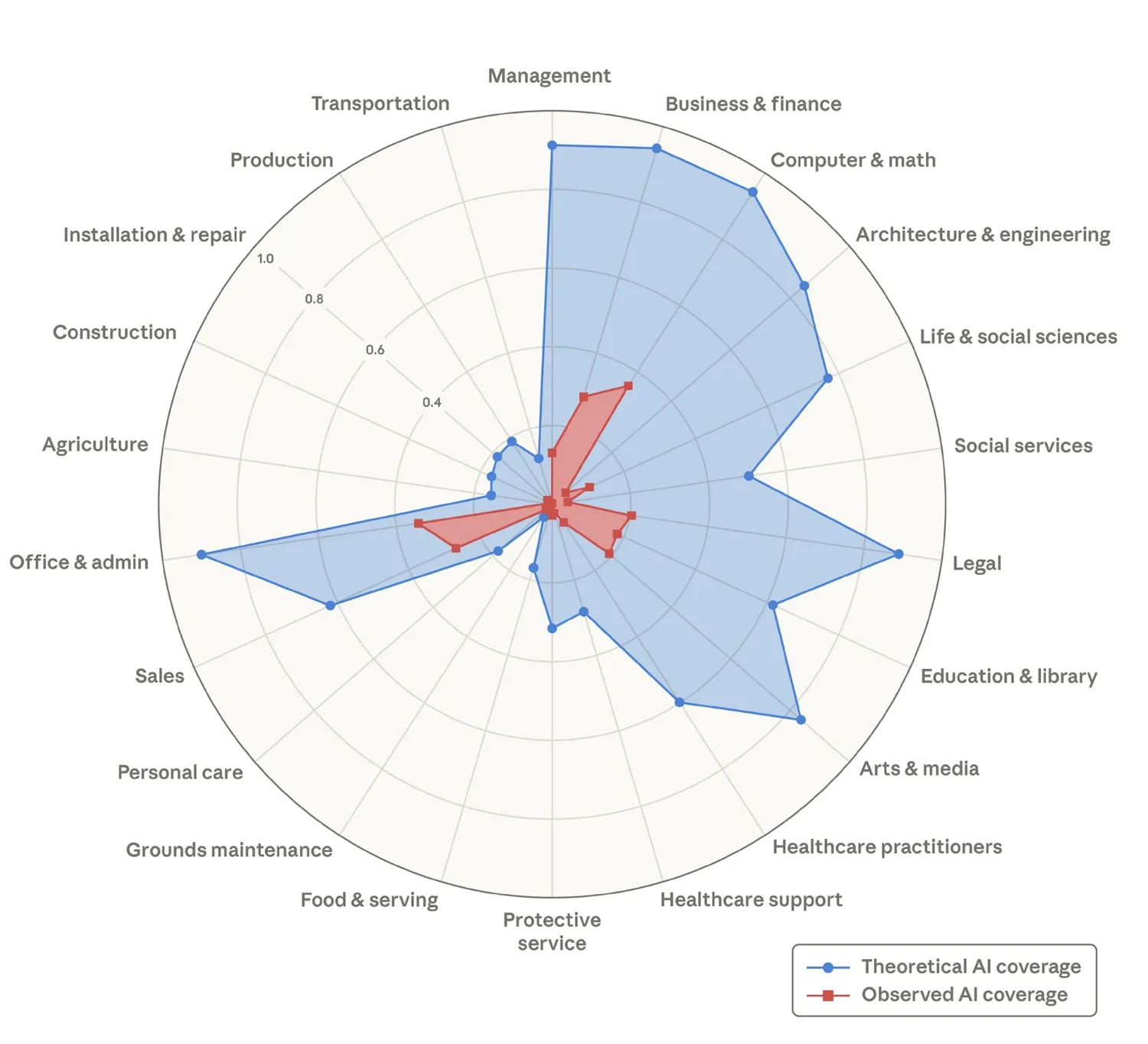
AI coverage across job sectors. Source: Anthropic
As we can see, in theory, artificial intelligence could almost entirely replace workers in sectors such as:
- management,
- business & finance,
- computer & math,
- office & admin,
- architecture & engineering,
- legal,
- arts & media.
However, in practice, the actual level of automation in these fields remains significantly lower. Therefore, at this stage, AI should be viewed not as a threat, but rather as a powerful tool for enhancing productivity.
AI doesn’t so much replace specialists as it does relieve them of routine, repetitive, and technical tasks. As a result, people have more time for tasks that truly require critical thinking, good judgment, responsibility, and an understanding of context.
That is precisely why today we increasingly talk not about replacing people, but about a new partnership: humans and AI work better together than they do separately.
Neural networks are already taking on part of the work in copywriting, analytics, and research: they help gather information, structure materials, draft texts, generate ideas, formulate theses, or condense large volumes of data into a clear summary. But it’s important to note that AI doesn’t replace the role of a specialist. It doesn’t understand the business context as deeply as a human, doesn’t fully grasp the audience, and isn’t accountable for the outcome. Therefore, a neural network here isn’t an author or an expert, but a quick assistant that allows you to start not from a blank page, but from a pre-prepared foundation.
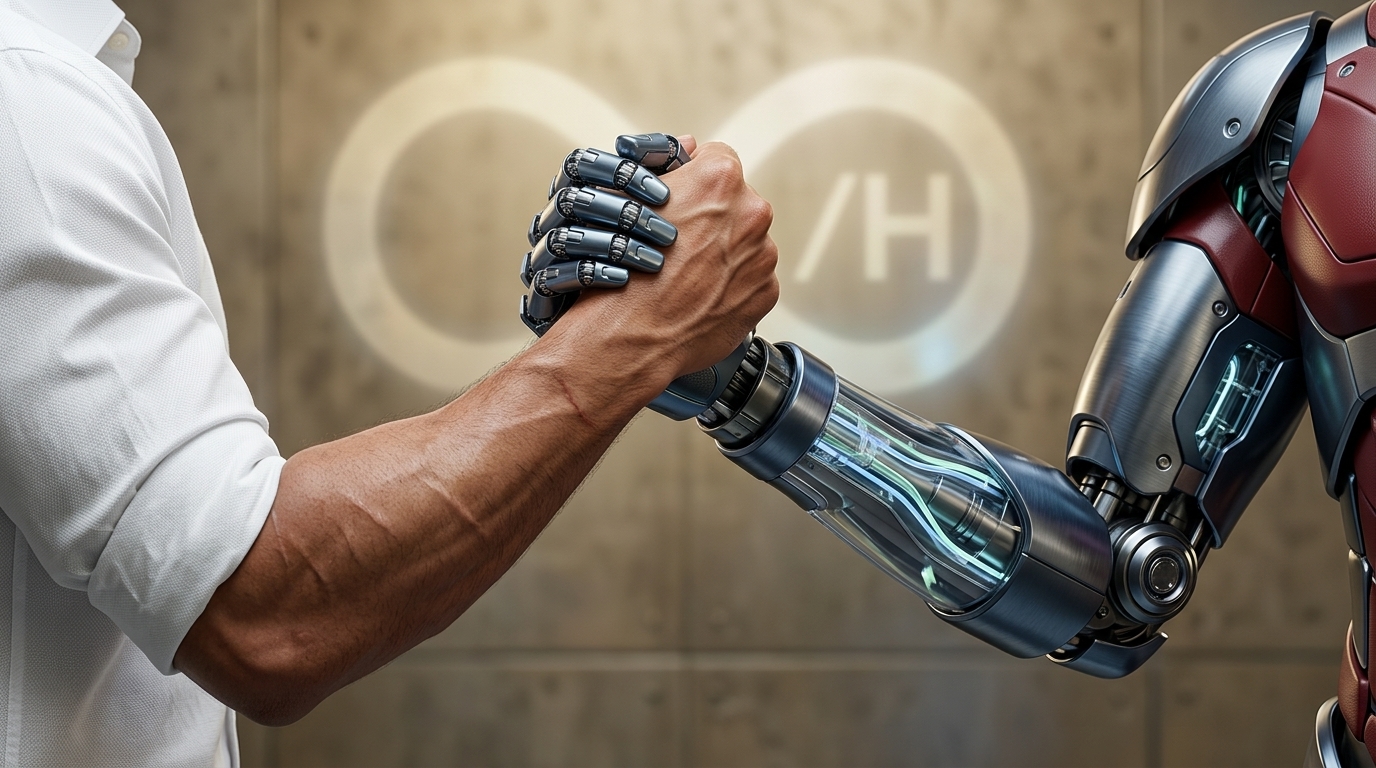
People and AI can work together
One of the most noticeable effects of AI is a significant increase in productivity. Tasks that used to take hours—such as searching for information, preparing options, or writing a first draft—can now be completed in minutes. Now, marketers can develop hypotheses faster, managers can draft letters and reports, designers can create mockups and concepts, and analysts can produce summaries and conclusions. A designer using generative models can create a concept board in 15 minutes instead of 5 hours. But the key point is that it’s not just the process that’s accelerated, but also decision-making: AI helps move from idea to action faster.
A study conducted by NNGroup in 2023 showed a 66% increase in productivity among employees using AI tools for work:
- Support agents who used AI could handle 13.8% more customer inquiries per hour.
- Business professionals who used AI could write 59% more business documents per hour.
- Programmers who used AI could code 126% more projects per week.
At first glance, 66% may not seem like a huge figure, but by comparison: average labor productivity growth in the United States was 1.4% per year during the 12 years before the COVID-19 pandemic (2007–2019), according to the Bureau of Labor Statistics. In the European Union, average labor productivity growth was 0.8% per year during the same period, according to Eurostat.
The 66% productivity gains from AI equate to 47 years of natural productivity gains in the United States. And AI corresponds to 88 years of growth in the European Union!
Top 10 jobs that are already changing
One of the leading developers of artificial intelligence tools is Anthropic, the company behind the Claude neural network. On its website, the company regularly updates data on how Claude is being used in different countries and across various professions. Currently, the site features information on 974 jobs.
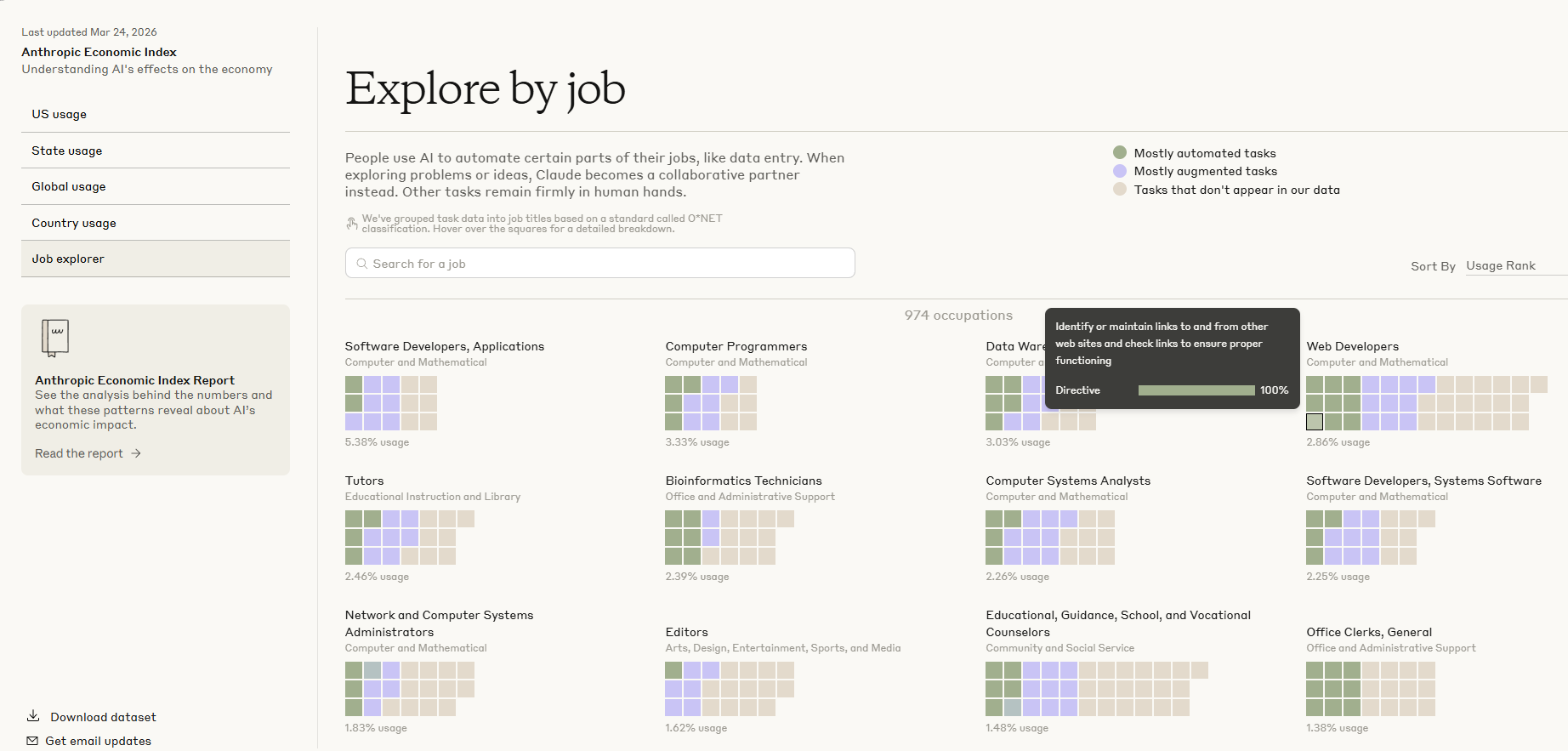
AI's effects on the economy. Source: Anthropic
There, you can see how actively Claude is used in specific fields and what kinds of tasks it helps solve. This provides an interesting snapshot of the information, but it’s not exhaustive, because it’s just one neural network, whereas a modern employee might use two, three, or more AI tools from different developers in their work.
Let’s take a look at 10 in-demand occupations: how artificial intelligence is used in them to solve real-world problems.

Occupation: Marketer
What has changed: Whereas previously a significant portion of time was spent on manual data collection, drafting, competitor analysis, and formulating hypotheses, these stages can now be completed much more quickly. Marketers increasingly work not from a blank slate, but with material that has already been collected, structured, and partially processed by AI. Creating a full-fledged advertising campaign, which used to take weeks, has now been reduced to a few days or even hours.
Highly automated tasks: AI can already quickly collect and structure data on competitors, analyze prices, offers, promotion channels, and positioning features. It excels at generating drafts of ad copy, emails, ads, content plans, and headline variations. AI can also be used for initial audience segmentation, analyzing large sets of reviews, research, and market data, as well as for identifying trends, references, and marketing hypotheses.
AI-assisted tasks: In many other tasks, AI does not replace the marketer but significantly enhances their work. It helps prepare reports faster, visualize research findings, process industry statistics, and identify patterns in audience behavior. AI is useful for preparing marketing strategies, developing A/B hypotheses, finding ideas for campaigns, and conducting research prior to product launch. However, in these cases, it remains more of an acceleration tool than an independent executor, because the quality of the result still depends on how the task is framed and on professional interpretation.
What remains up to humans: Marketers are still responsible for key decisions, strategy selection, understanding market and business context, prioritizing hypotheses, developing creative concepts, and the final interpretation of data. It is the human who determines which conclusions are truly important, which ideas align with the brand and which do not, and which actions will lead to the desired result. AI does not take responsibility for the quality of communication, the adequacy of the strategy, or the final outcome.
Which AI tools to use: ChatGPT for texts, hypotheses, analysis, and drafts. WriterZen and Content Harmony for keyword clustering and creating briefs for copywriters based on Google search results. Gemini for analyzing data in Google Docs and Sheets. Midjourney for visual concepts and creative references. Claude for working with large documents and precise text editing, as well as Notion AI for note-taking.

Occupation: Copywriter
What has changed: Whereas it used to take a lot of time to find the right wording, gather material, structure the text, and draft several versions, AI now helps do this much faster. As a result, the role of the copywriter is increasingly shifting from simply writing text to managing meaning, style, accuracy, and alignment with business objectives.
Highly automated tasks: AI is already quite capable of automating the creation of drafts for articles, social media posts, product descriptions, advertising copy, email newsletters, and headlines. It can also quickly analyze sources, suggest text structures, adapt content to different formats, rewrite texts in a different tone, and generate multiple variations of the same idea. AI excels particularly at standard, high-volume, and repetitive text tasks.
AI-assisted tasks: In more complex work, AI acts as an assistant: it can suggest ideas for a content plan, select supporting arguments, assist with SEO structure, draft a landing page, improve text readability, shorten or expand content, and adapt it to the target audience.
What remains up to humans: The copywriter retains responsibility for understanding the product, audience, and context; choosing the right tone; working with meaning; ensuring originality; applying editorial judgment; and taking responsibility for the text’s quality. A human decides how well the text fits the task, whether it looks formulaic, whether it is persuasive, and whether it achieves its goal. It is also the human who fact-checks, removes inaccuracies, and makes the text lively and powerful.
Which AI tools to use: ChatGPT and Claude for drafting, editing, generating ideas, adapting style, and working with text. Perplexity and Gemini are useful for quickly finding information and conducting research. Notion AI can be helpful for organizing notes and preparing content plans. Nano Banana or GPT Image can be useful for creating illustrations.

Occupation: Programmer
What has changed: With the advancement of AI, a programmer’s work has become significantly faster, especially when it comes to writing boilerplate code, debugging, understanding others’ code, and working with documentation. Now, AI can help write boilerplate code more quickly, suggest solutions, explain syntax, and even suggest architectural options. Therefore, the role of a programmer is gradually shifting from simply writing code to designing, testing, integrating, and ensuring the quality of solutions.
Highly automated tasks: AI excels at generating boilerplate code, writing simple functions, auto-completion, refactoring straightforward sections, and writing tests, comments, and documentation. It can also assist with converting code from one language to another, identifying common errors, and quickly explaining what a specific code snippet does. This is particularly useful for routine and repetitive tasks.
AI-assisted tasks: In more complex development, AI helps analyze the codebase, identify potential causes of bugs, suggest optimization options, speed up work with APIs, documentation, and database queries, and assist in learning new technologies. But in real-world projects, AI functions precisely as an assistant: it can suggest a solution, but it doesn’t always understand the full context of the system, business constraints, or requirements for security, performance, and support.
What remains up to humans: The programmer remains responsible for system architecture, understanding business logic, technology selection, evaluating trade-offs, security, ensuring the solution’s reliability, and final code review. It is the human who makes decisions about how the system should function as a whole, how it will scale, and how secure and maintainable it is. Humans are also responsible for ensuring that the code not only works but is appropriate, sustainable, and meets project requirements.
Which AI tools to use: ChatGPT and Claude for explaining code, generating draft solutions, refactoring, writing tests, and working with documentation. GitHub Copilot and similar tools are useful directly within the development environment for autocompletion and speeding up code writing. Gemini and Perplexity can assist with finding documentation, comparing technologies, and conducting quick technical research.

Occupation: Designer
What has changed: Artificial intelligence has significantly simplified the stages of brainstorming and developing initial concepts. With the help of AI, you can quickly generate several concepts, composition variations, color schemes, and even finished images. As a result, the designer’s role is increasingly shifting from manually creating each element to selection, refinement, systematic thinking, and managing visual quality.
Highly automated tasks: AI already effectively automates the generation of concept art, simple illustrations, variations of banners, backgrounds, icons, advertising creatives, and rough layouts. AI can also quickly remove backgrounds, enhance images, change styles, expand images, generate multiple visual options based on a single description, and assist with content preparation for routine tasks. This is particularly effective when a rapid flow of ideas or a large volume of similar visual materials is required.
AI-assisted tasks: In more complex work, AI helps designers explore visual directions, test styles, and develop options for interfaces, presentations, or advertising materials. It can be useful for preparing UX copy, describing user scenarios, generating ideas for visual communication, and speeding up routine tasks.
What remains up to humans: AI does not replace design thinking: it does not always understand the brand, the task, product constraints, audience behavior, or the logic of the user experience. Therefore, the designer retains responsibility for understanding the task, a sense of composition, taste, and appropriateness, knowledge of the audience, working with the brand, interface logic, the visual system, and the user experience. It is the human who decides which option truly works, which visual solutions align with business goals, and how user-friendly, understandable, and consistent the design is. The designer is also responsible for originality, quality, and the integrity of the system, ensuring that the result is not just beautiful, but functional and meaningful.
Which AI tools to use: Midjourney, Nano Banana, DALL·E, and Adobe Firefly — for generating visual concepts, illustrations, and quick creative options. ChatGPT and Claude can assist with concept formulation, UX copy, presentation structure, and idea generation. Figma AI and Adobe tools are useful for speeding up work within a familiar design environment, especially when preparing mockups, editing content, and performing routine tasks.

Occupation: Business Analyst
What has changed: With the advancement of AI, the work of a business analyst has become faster in terms of processing information, preparing documents, analyzing requirements, and structuring large volumes of data and text. Less time is now spent on describing processes, preparing meeting summaries, and formalizing tasks. As a result, the role of the business analyst has shifted from the mechanical recording of information to interpretation, coordination, prioritization, and the development of a logic for business changes.
Highly automated tasks: AI effectively automates the transcription and summarization of meetings, as well as the preparation of draft requirements, technical specifications, summary tables, and comparisons. It can also assist with classifying requests, identifying key issues, compiling risk lists, preparing template reports, and transforming unstructured information into a more understandable format. This is particularly useful in environments with a high volume of repetitive documentation and communication tasks.
AI-assisted tasks: In more complex analytical work, AI helps analyze business processes, identify contradictions in requirements, formulate hypotheses, prepare questions for stakeholder interviews, improve the structure of documentation, and assist with domain research. It can accelerate the preparation of presentations, justifications, and problem-solving options.
What remains up to humans: AI cannot fully replace a business analyst when it comes to considering the hidden interests of stakeholders, the organizational context, real-world business constraints, and the nuances of implementing changes. Therefore, the business analyst remains responsible for communicating with stakeholders, identifying true business needs, resolving conflicts, prioritizing requirements, making decisions under uncertainty, and ensuring the accuracy of interpretations. It is the human who understands what the business truly needs, which changes are realistic, where the risks lie, and how to translate the interests of different parties into a workable solution. The human is also responsible for the quality of requirements, the logic of processes, and ensuring that changes actually deliver value.
Which AI tools to use: ChatGPT and Claude for drafting requirements, structuring information, generating questions, and analyzing documents. Notion AI, Microsoft Copilot, and similar tools are useful for working with notes, emails, spreadsheets, and internal documentation. Perplexity and Gemini can assist with market research, comparing solutions, and quickly finding information within a specific subject area.

Occupation: Product Manager
What has changed: Artificial intelligence has reduced the time spent gathering user insights and analyzing feedback, structuring interviews, preparing presentations, formulating hypotheses, and synthesizing data from various sources. As a result, the role of the product manager has shifted from manually processing information and filling out spreadsheets to setting the direction, prioritizing tasks, coordinating the team, and defining the product’s future.
Highly automated tasks: AI effectively automates the initial analysis of user feedback, as well as the preparation of PRD drafts, presentations, emails, and reports. It can quickly group feedback by topic, identify recurring points, formulate hypotheses, prepare template documents, and assist in describing functionality. AI is also useful for competitive analysis, gathering market intelligence, and creating initial drafts of product copy.
AI-assisted tasks: In more complex work, AI helps the product manager analyze user segments, look for patterns in customer behavior, generate solution options, design experiments, and formulate metrics and product usage scenarios. It can be useful in synthesizing qualitative and quantitative data, as well as in communicating with designers, analysts, and developers.
What remains up to humans: The product manager remains responsible for choosing the product’s development direction, understanding real user needs, balancing business and customer interests, making decisions under conditions of incomplete information, and taking responsibility for the outcome. It is the human who determines which problems to solve, which hypotheses to test, what to sacrifice when resources are limited, and how to set the team’s priorities. The human also retains the ability to influence without direct authority, manage expectations, and shape the product vision.
Which AI tools to use: ChatGPT and Claude for drafting documents, analyzing interviews, structuring hypotheses, generating ideas, and formulating requirements. Notion AI, Microsoft Copilot, and Google Gemini are useful for working with notes, spreadsheets, email, and presentations. Perplexity can be useful for quick market and competitor research, while DeepSeek is useful for identifying patterns in user data and feedback.

Occupation: Recruitment specialist
What has changed: With the advancement of AI, recruiters can now search for candidates and process large volumes of applications more quickly. Whereas previously a significant amount of time was spent manually reviewing resumes, drafting job descriptions, writing repetitive messages, and organizing the recruitment stages, AI now helps automate many of these tasks.
Highly automated tasks: AI effectively automates the drafting and refinement of job postings, initial resume screening, matching candidates’ skills to role requirements, drafting template messages, and summarizing interview results. Artificial intelligence can help rank candidates based on formal criteria, identify key skills, verify the completeness of profiles, and speed up the processing of a large number of applications. This is particularly useful in mass recruitment and in situations involving many similar job openings and repetitive stages.
AI-assisted tasks: In more complex work, AI helps define the ideal candidate profile, improve the hiring funnel, analyze reasons for rejections, identify bottlenecks in the recruitment process, and prepare interview questions. It can be useful for analyzing the candidate market, salary expectations, and competitive job openings, as well as for preparing arguments for the hiring manager.
What remains up to humans: The human recruiter is responsible for building trust with the candidate, assessing motivation, understanding the nuances of a specific team, addressing doubts and expectations, and aligning decisions between the candidate and the business. It is the human recruiter who best understands how well a candidate truly fits the company—not only in terms of skills but also in terms of work style, maturity, flexibility, and career expectations. The human recruiter is also responsible for hiring ethics, reducing bias, safeguarding the candidate experience, and making final decisions together with hiring managers.
Which AI tools to use: Juicebox (PeopleGPT) for searching for candidates based on semantic queries. ChatGPT and Claude for drafting job postings, screening resumes, and writing messages to candidates. DeepSeek for describing complex technical roles and preparing questions for candidates. Microsoft Copilot and Notion AI for searching, sorting, and managing the candidate database. Fireflies.ai, Otter.ai, Gorgias, Flowrite, and similar tools for transcribing audio to text, speeding up feedback, and documenting communication outcomes.

Occupation: Customer support specialist
What has changed: With the advancement of AI, the role of customer support has shifted significantly toward the automation of routine inquiries. Whereas previously most of the time was spent answering repetitive questions, routing requests, searching for information in the knowledge base, and manually processing inquiries, AI chatbots and intelligent assistants now handle a significant portion of these tasks. As a result, the role of a support specialist is increasingly shifting from simply following a script to resolving non-standard situations, alleviating customer stress, and maintaining service quality in complex cases.
Highly automated tasks: AI effectively automates responses to frequently asked questions, initial classification of inquiries, determining the subject and urgency of a request, translating messages, extracting data from correspondence, and preparing template responses. It can quickly suggest relevant knowledge base articles to the agent, create tickets, determine the customer’s sentiment, and route the inquiry to the appropriate team. In some companies, AI is already capable of fully resolving a significant portion of routine inquiries without human intervention.
AI-assisted tasks: In more complex situations, AI helps agents understand the context faster, view the history of interactions with a specific customer, find similar cases, formulate accurate responses, and adhere to communication tone standards. AI is useful in multi-channel support, where agents need to quickly switch between chats, email, and calls. AI can also suggest next steps, warn of the risk of escalation, and assist in training new employees using real-world cases.
What remains up to humans: Support specialists retain responsibility for empathy, conflict de-escalation, decision-making in non-standard situations, protecting the client’s interests within company policy, and the ability to take responsibility in contentious situations. It is the human who is better at handling complex negotiations, when it is important for the client not only to receive an answer but also to feel that they have truly been understood. The specialist also retains the ability to improve the customer experience, share insights with management, and make decisions where rules do not fully cover the situation.
Which AI tools to use: Intercom Fin, Zendesk, and Freshdesk for automatic classification, searching for answers in the knowledge base, and providing the agent with a brief summary of the conversation. ChatGPT, Claude, and Microsoft Copilot for preparing responses, summarizing interactions, improving communication quality, and accelerating request processing. Gong and Dialpad for transcribing calls to text. Sentiment Analysis to identify the most dissatisfied customers in incoming messages so they can be addressed first. Glean and Notion AI for drafting responses based on successfully closed tickets.
Occupation: Teacher
What has changed: The use of AI tools in teaching has reduced the time spent on creating lesson plans, selecting exercises, grading sample assignments, and explaining the same material to different students. Consequently, the role of the teacher is gradually shifting from the mere transmission of information to organizing learning, developing critical thinking, fostering motivation, and guiding the educational process.
Highly automated tasks: AI effectively automates the creation of drafts for instructional materials, tests, exercises, flashcards, presentations, lesson plans, and tasks adapted to different student levels. It can assist with grading sample assignments, generating examples, crafting questions, translating materials, simplifying or complicating text, and preparing brief explanations on a topic.
AI-assisted tasks: In more complex work, AI helps educators analyze gaps in students’ knowledge, suggest personalized learning paths, tailor the format of explanations to specific students, and prepare additional materials for struggling or advanced students. AI also helps provide feedback more quickly and make learning more adaptive. However, AI cannot fully replace live pedagogical interaction because it does not bear real responsibility for a student’s development and does not sense the group in the same way a teacher does.
What remains up to humans: The teacher remains responsible for pedagogical guidance, motivating students, fostering critical thinking, creating a safe and supportive environment, assessing the depth of understanding, and fulfilling the formative role where it matters. It is the teacher who is better able to notice when a student has not merely failed to grasp a topic but has lost confidence, interest, or engagement. Teachers also retain responsibility for fostering a culture of discussion, developing independence, ensuring ethical use of AI in learning, and making decisions about what and how to teach within a broader educational context.
Which AI tools to use: Perplexity for preparing academic materials with references to sources. Microsoft Copilot, Google Gemini, and Notion AI help with working on documents, presentations, spreadsheets, and personalizing materials. QuestionWell for generating questions and tests. Curipod for creating interactive presentations.
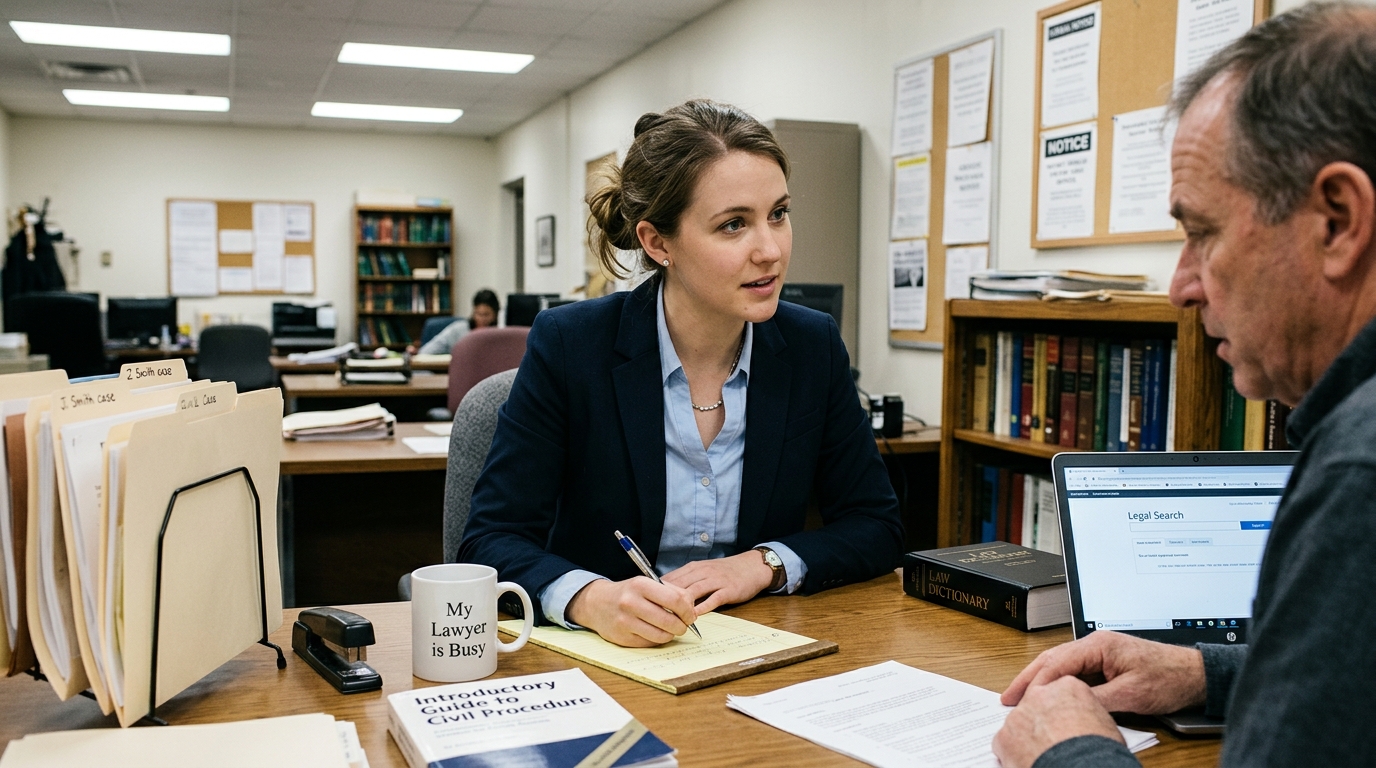
Occupation: Lawyer
What has changed: Whereas lawyers used to spend a great deal of time searching for legal provisions, conducting preliminary analysis of case law, drafting standard documents, verifying wording, and organizing case materials, a significant portion of these tasks can now be completed more quickly with the help of AI. Consequently, the role of a junior lawyer is gradually shifting from simply “finding and drafting” to “verifying, interpreting, comparing, and preventing errors.”
Highly automated tasks: AI effectively automates the preparation of drafts for standard contracts, powers of attorney, letters, claims, NDAs, internal policies, and simple legal memos. It can quickly extract key provisions from documents, compare contract versions, identify risks in standard clauses, group legal positions, and assist with initial searches of regulations and case law. AI is also useful for checking document structure, simplifying complex text, translating legal language into more understandable terms, and creating templates.
AI-assisted tasks: In more complex work, AI helps lawyers quickly grasp the context of a case, compile an initial list of questions, prepare a list of arguments, identify potential weaknesses in a position, and propose a structure for legal analysis. It is useful for analyzing large volumes of documents, preparing questions for clients, and organizing facts. AI also helps novice lawyers learn: it explains terms, demonstrates the logic of a document, and suggests alternative wording.
Caution! AI can make mistakes in citing legal provisions, confuse jurisdictions, invent case law, or propose a weak conclusion with excessive confidence; therefore, using it without human verification is risky.
What remains up to humans: Lawyers retain legal expertise, responsibility for conclusions, interpretation of legal provisions in a specific context, consideration of case law, and professional judgment where there is no clear-cut answer. It is the human who must understand how applicable a rule is, where the risks lie, how best to formulate a position, what to tell the client, and what the consequences of the chosen decision will be. Also left to the human are negotiations, litigation strategy, ethics, confidentiality, client trust, and the final review of any documents.
Which AI tools to use: ChatGPT for drafting simple complaints, claims, and client letters. It helps translate complex legal language into plain English. Claude for analyzing long documents and identifying “hidden pitfalls” within them. Perplexity for finding information with links to sources. Otter.ai or Fireflies for transcribing audio to text and briefly analyzing the content of audio recordings. Caselook or Casebook for in-depth analysis of court cases. They help predict the outcome of a dispute based on AI analysis of similar rulings by a specific judge.
Which skills are becoming critical
Just as the calculator did not eliminate the profession of accountant, and the word processor did not do away with the work of writers, so too are neural networks merely a tool—a new way of performing tasks. Therefore, the question is not “will AI replace people,” but rather “which professionals will learn to work with it better than others” .
The key skills are:
- the ability to work with prompts (prompt engineering),
- critical thinking,
- fact-checking,
- digital literacy,
- creativity.
We wrote about how to properly formulate prompts in one of our previous articles. In short: it’s not enough to simply turn to AI — you need to clearly define the task, provide context, clarify details, and, if necessary, adjust the prompt to get a truly useful result. The quality of the final work increasingly depends on this.
Critical thinking is becoming an equally important skill. As AI becomes increasingly involved in generating text, analyses, and solutions, there is a growing need to verify the information received, spot inaccuracies, identify logical gaps, and distinguish between persuasive presentation and actual accuracy.
Even the best language models are prone to hallucinations — this is when a chatbot makes up facts on the fly. The most egregious case occurred in 2023 (Mata v. Avianca, Inc.). Attorneys Steven Schwartz and Peter LoDuca used ChatGPT to draft a motion, and the neural network “found” several convincing precedents at once, complete with case numbers and citations.

Steven Schwartz
The problem came to light when neither the judge nor the opposing counsel could find these cases in the databases. It turned out that the AI had simply hallucinated (made up) them. As a result, the lawyer and his firm not only faced worldwide embarrassment but also a $5,000 fine, and the judge emphasized that while the use of AI in law is permissible, the responsibility for the accuracy of every word lies with the human.
At the same time, the role of creativity is growing. The more routine tasks are handed over to algorithms, the more evident the value of the human ability to propose unconventional ideas, identify new approaches, and transform automated results into meaningful and substantive products becomes. It is precisely this combination of technological adaptability, critical thinking, and a creative approach that makes a specialist resilient to change and in demand in the new professional environment.
How to Start Using AI Right Now
Integrating AI into your workflow is easier than it seems. The best approach is to start with 2–3 tools that are truly suited to your specific tasks: for example, for text processing, data analysis, idea generation, routine automation, or image processing. This approach allows you to quickly understand exactly where AI provides the most benefit, without overloading your processes with unnecessary services.
The next step is to integrate AI into your daily tasks. Use it where you already spend time every day: writing emails, preparing texts, brainstorming ideas, making plans, handling customer requests, summarizing documents, or translating. It is regular use that yields real results: AI becomes not just a “cool feature,” but a practical tool that saves time and improves the quality of the output.
Once the basic scenarios are up and running, it’s time to move to the next level — automating repetitive processes. These can include standard responses, creating template texts, processing similar data, generating descriptions, converting audio to text, sorting information, and other routine operations. The more repetitive tasks you delegate to AI, the more time you free up for strategic, creative, and higher-value work.
To make getting started easier, it’s helpful to compare different models in one place and select the best tool for a specific scenario. TalkAI provides access to various ChatGPT, Claude, Gemini, and DeepSeek models for text processing, as well as GPT Image and Nano Banana models for image generation.
It’s important to understand: AI won’t replace humans on its own, but professionals who ignore these new tools may indeed be overtaken by those who already know how to use them in their work. That’s why the key skill today isn’t just mastering a specific neural network, but the ability to adapt quickly, test new solutions, and choose the best AI for the task. Now is the best time to start, because the market is changing very quickly, and those who master the technology before others gain the advantage.
If you want to choose the best AI for the task and start applying it in practice right away, try TalkAI — it’s a convenient way to test the capabilities of modern AI tools and find a solution that really works for you.